
Updated – 30th October 2019
In this blog I will show some feature of NSX-T integration with Kubernetes. In NSX-T several constructs are automatically created to support Kubernetes cluster. Before I deep dive, let look at the lab topology.
The Kubernetes environment of this lab is located behind a NSX Tier-0 (provider) virtual router. Review the IP space that will be used for this blog in the below picture


Here is the lab layout as seen through vCenter.
- The RegionA01-MGMT cluster runs the NSX-T control plane and gateway only. Hypervisors are not prepared as transport nodes.
- The RegionA01-COMP01 cluster runs the Kubernetes nodes, and its Hypervisors are prepared as transport nodes.
The Kubernetes VMs are connected to two logical switches,
- k8s-mgmt is the logical switch for the management connections to each Kubernetes nodes.
- k8s-nodes-vifs is the logical switch for the Pod traffic.

Kubernetes Namespaces
As discussed in my previous blog
https://wordpress.com/block-editor/post/why2cloud.home.blog/35 Kubernetes has namespaces to restrict resources.
By default, all resources in Kubernetes cluster are created in a default namespace. A pod will run with unbounded CPU and memory requests/limits. A Kubernetes Namespace allows to partition created resources into a logically named group. Each Namespace provides:
- A unique scope for resources to avoid name collisions.
- Policies to ensure appropriate authority to trusted users.
- Ability to specify constraints for resource consumption.
This allows a Kubernetes cluster to share resources by multiple groups and provide different levels of QoS for each group. Resources created in one namespace are hidden from other namespaces. Multiple namespaces can be created, each potentially with different constraints.
Namespace and NSX

Adding NSX to Kubernetes provides us a whole new set of capabilities.
- A separate network topology gets build upon the creation of each Kubernetes Namespace. Every K8s Namespace gets one or more Logical Switches and one Tier-1 Router.
- The Kubernetes Nodes are not doing IP routing, every K8s Pod has its own Logical Port on a Logical Switch. Every Node can have Pods from different Namespaces and, with this, from different IP subnets / topologies.
- Every K8s Pod has Distributed Firewall rules applied on its Interface. At the hypervisor layer.
- High performance East/West and North/South routing is done using NSX-T routing infrastructure, including dynamic routing to physical network.
- Every K8s Pod has a Logical Port on the K8s Namespace Logical Switch, which from a visibility/troubleshooting perspective allows:
- Counters.
- SPAN / Remote mirroring.
- IPFIX.
- Traceflow / Port-Connection (native NSX-T tools).
- Spoofguard.
- NSX is used to provide IP Address Management (IPAM), supplying Subnets from IP Blocks to Namespaces, and individual IPs/MACs to Pods.
NSX Container Plugin – NCP

- NCP is a software component provided by VMware in form of a container image, to be run as an infrastructure K8s Pod.
- NCP is build in a modular way, so that individual Adapters can be added for different CaaS and PaaS systems.
- NCP consumes from the NSX infralayer, implementing the logic that creates topologies, attaches Logical Ports, etc. Based on triggers from the Adapter layer.
- NCP uses an API Client to talk to NSX, which implements a standardized interface to the NSX Manager API.
Steps to install NCP in K8 nodes can be found at VMware website:
https://docs.vmware.com/en/VMware-NSX-T-Data-Center/2.3/nsxt_23_ncp_kubernetes.pdf
NCP Namespace creation workflow

- NCP creates a watch (a service looking for something to happen) on the K8s API for any Namespace events.
- A user creates a new K8s Namespace.
- With the watch, the K8s API server notifies NCP of the change (addition) of a Namespace.
- NCP creates the network topology for the Namespace:
- a) Requests a new subnet from the pre-configured IP block in NSX.
- b) Creates a Logical Switch (LS).
- c) Creates a Tier-1 Router and attaches it to the pre-configured global Tier-0 Router.
- d) Creates a Router Port on the Tier-1 Router, attaches it to the LS, and assigns an IP from the new subnet.
NSX Switching and Routing for K8 Namespaces


Look at the list of switches and you will find the three switches that share the same name as the Kubernetes Namespaces you saw on the k8s-master Putty session. These were created by NCP.
The switches are:
- k8s-cl1-default-0
- k8s-cl1-kube-public-0
- k8s-cl1-kube-system-0

Clicking on the switch name brings up the Overview page and more information about the switch.
- If it isn’t open, click on the Tags arrow to open up the Tags information section. Tags are used for the K8s integration with NSX-T / NCP. For example, the cluster name in tags matches the cluster name in K8s.
- Click on the Subnets arrow. Note the subnet that is assigned to the switch. You will see how this aligns to the IP Pool integration with NSX later.

There are several routers that have been setup for Kubernetes and for the lab to function.
- The Tier-0 Router is our border router with the external network, while the Tier-1 Router types are separating routers per tenant of domain.
- For K8s, you will find the Tier-1 Routers have matching names to our Namespaces.


Here you will find the ports configured on the Tier-1 Router along with the type of port and its IP address.
NSX and IP Management for K8 namespaces


Here you will find the K8s IPAM blockthat has been setup for this environment. NSX acts as the IPAM and provides IP addressing for Kubernetes. IP subnets for Namespaces are dynamically created out from a user defined IP Block.
- Click on the k8s-nat-block link to review assigned Subnets for the IPAM Block.
- Click on the Subnets tab.

Here you can find the IPAM block information in more details.
- Now you can see the details about the subnets and their assignments. Here you see the different CIDR and IP ranges assigned.
Create a new Namespace


Remembering the steps we took previously, in similar lines a Tier-1 router and a new subnet will be created, related to the new nsx-ujo Namespace.

After creating the nsx-ujo Namespace, the logical layout of the lab has been updated. Here is a visual representation of this new layout.
NOTE: IP addressing may be different in your case, but it will always be within the 10.4.0.0/14 ip block which is the master block configured to be used in NSX-T for this K8 environment.
Kubernetes PODs
Now that we have created our own namespace in K8 environment, next stpe is to deploy some PODs in this namespace. First switch the context to correct namespace.


This is a YAML file which defines a Replication Controller object in K8s. It’s specifying a desired state of 4 replicas of the image yfauser/nsx-demo andexposes port 80.


Notice that each nsx-demo-rc-xxxxx has a different name and a different IP from the subnet that was allocated to this namespace.
Checking Connectivity across PODs
To test the connectivity, we ll ping from one POD to another POD and also from one POD to Tier-0 router.
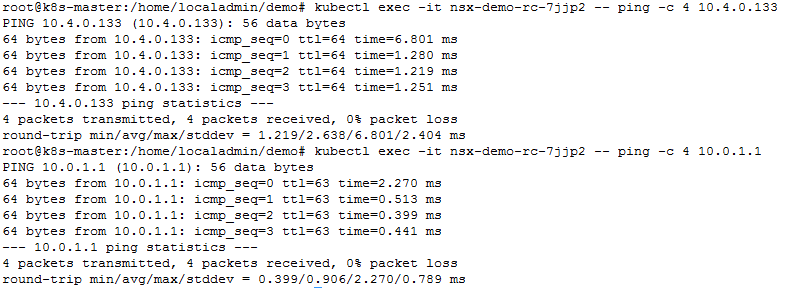
In above test, we pinged from POD named “nsx-demo-rc-7jjp2” to another POD with IP 10.4.0.133. Result was success.
Also, we pinged from same POD to Tier-0 router IP. Again success.

Now lets review ports in NSX-T


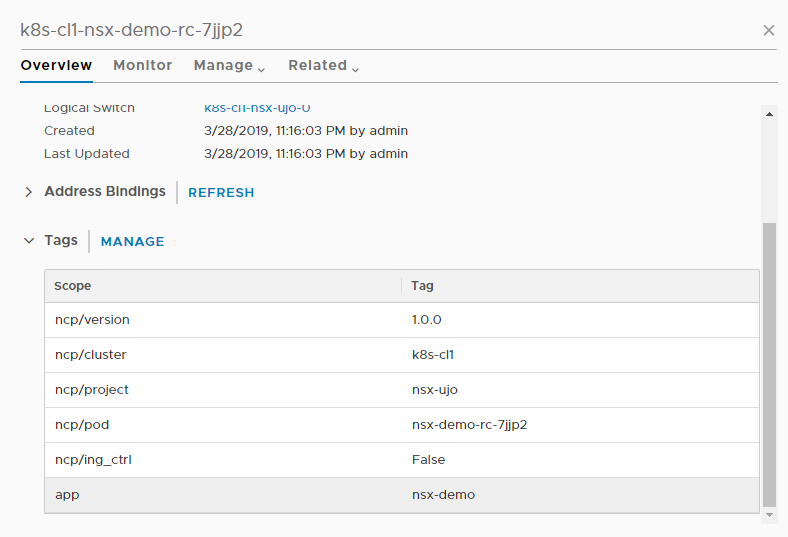
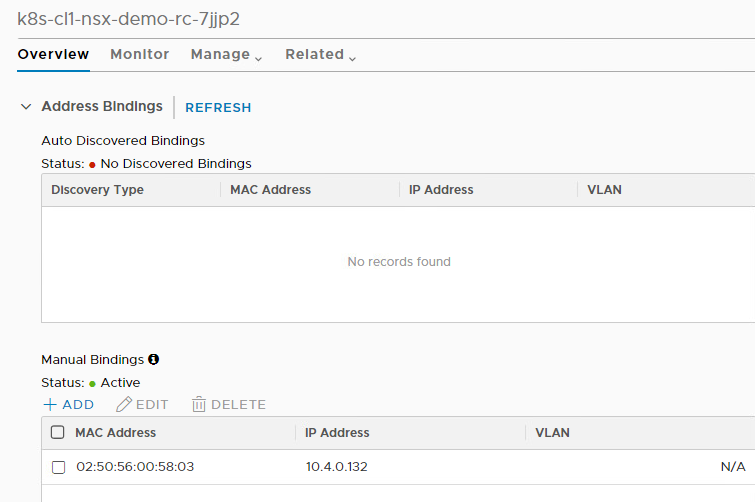
For micro segmentation in Kubernetes with NSX-T refer to my next blog.

 what-the-cloud